





Lottie animation
What is Lottie? It packs an animation into a light, sharp file you can use on a website. Learn how to recolour it to your brand, how to use it on WordPress and Next.js, and try it out right in the article.
October 1, 2026
Lottie packs an animation into a file you can share and use across platforms, the way you would share an image or a video file. This article covers what Lottie is, where it fits on a website and how to use it.
Most of the illustrations on the Perxel website use artwork from various authors on LottieFiles, recoloured to match Perxel's brand. Perxel also uses Lottie on client websites, both WordPress and Next.js.
What is Lottie
Lottie is an animation format developed by Airbnb. A designer makes the animation in After Effects and exports a Lottie file, or picks a ready-made one from the LottieFiles library. The file describes vector shapes and how they move, and the browser reads the file and redraws the animation.
Because it is vector, the animation renders sharp at any screen size. Because the file holds data rather than fixed pixels, you can still change colours and control speed and the timeline after export, much like a video, but lighter and sharper.
Sharpness
Lottie
Sharp at any size
GIF or video
Depends on the export resolution, blurry when enlarged
File size
Lottie
Flat illustrations are often only a few dozen KB
GIF or video
GIFs are usually much heavier. Video compresses better but grows with resolution and length
Recolouring
Lottie
Edit directly in the file
GIF or video
Must be re-exported from the source file
Control
Lottie
Play on scroll, on hover, once, change speed
GIF or video
Video has play, pause and speed. A GIF can hardly be controlled
Transparent background
Lottie
Yes
GIF or video
GIFs have jagged edges. Transparent video needs a separate format for Safari
Best for
Lottie
Flat illustration, icons, interface details
GIF or video
Live footage, 3D, textured imagery
For example, the rocket Lottie on the Perxel homepage is only 26 KB. The JSON inside is 283 KB, and the compressed .lottie format brings it to under a tenth of that. When handing over, designers should send the .lottie file instead of .json.
Choosing a Lottie file for a design
Before choosing a Lottie file for a design, a designer should check a few things:
- Choose flat vector shapes. Some Lottie files embed PNG images. They are heavier, blur when enlarged and are hard to recolour. Of the 22 Lottie files on the Perxel website, only 1 is like that.
- Solid colours are easier to change than gradients. Solid colours can be edited right in the file. Gradients often mean going back to After Effects or the LottieFiles editor.
- Check what background the animation will sit on. An illustration that looks good on white can disappear on a brand-colour background. The Perxel website has a separate light version for its blue cards.
- For a continuous loop, the first and last frames must match. Otherwise every loop has a visible jump.
Recolouring to match the brand
Files from LottieFiles may be drawn by many authors, so each has its own set of colours. Side by side they look inconsistent. Perxel recolours every file to one shared palette: the brand's blue range, warm neutrals and at most one orange accent, like a rocket's flame or a ray of light.
The palette is split by role: colours for outlines, for the light and dark sides of blue objects, for backgrounds and for accents. Each colour in the original file is mapped to a role, then the colour value is replaced right in the file. There's no need to reopen After Effects, and nearly 20 illustrations from different authors on Perxel now share one palette.
If a project has its own illustration palette, designers should send it with the handoff so the developer recolours correctly from the start instead of guessing.
Try it yourself
A Lottie file can be controlled freely like a video clip, and the special part is that you can change its colours. Try the controls below.
Playback modes:
- Play on scroll: the animation plays when it appears on screen and stops when you scroll past. Good for illustrations in sections.
- Play on hover: plays only when the pointer is over it. Good for cards and icons. Phones have no hover, so Perxel uses hover on desktop and switches to play on scroll on mobile.
- Play once: plays through and stops on the last frame. Good for moments like a form sent successfully.
Also:
- Speed: can be adjusted freely.
- Background colour: change it to suit where it is used.
When a design has animation, note the playback mode (scroll or hover) next to the frame in Figma. The developer won't have to guess, and it is part of keeping a clean Figma handoff.
What visitors experience
You may wonder whether adding animation slows the site down. This is how Perxel uses Lottie on its websites:
- Light files, so page weight doesn't grow. The Lottie files on this site range from 2 KB to about 110 KB, smaller than an ordinary PNG.
- Nothing plays off screen. Animation outside the viewport pauses, so the device doesn't spend resources rendering what nobody can see.
- No layout jump on load (CLS). The layout space is reserved before the file finishes loading, so the content below isn't pushed down.
- Respecting the viewer's settings. People who have turned on reduce motion in their operating system see a single still frame.
To render Lottie, the browser also needs to load a library of about 500 KB. Perxel hosts this library itself and loads it only on pages that have Lottie. The browser downloads it once and reuses it on later pages.
Lottie on WordPress
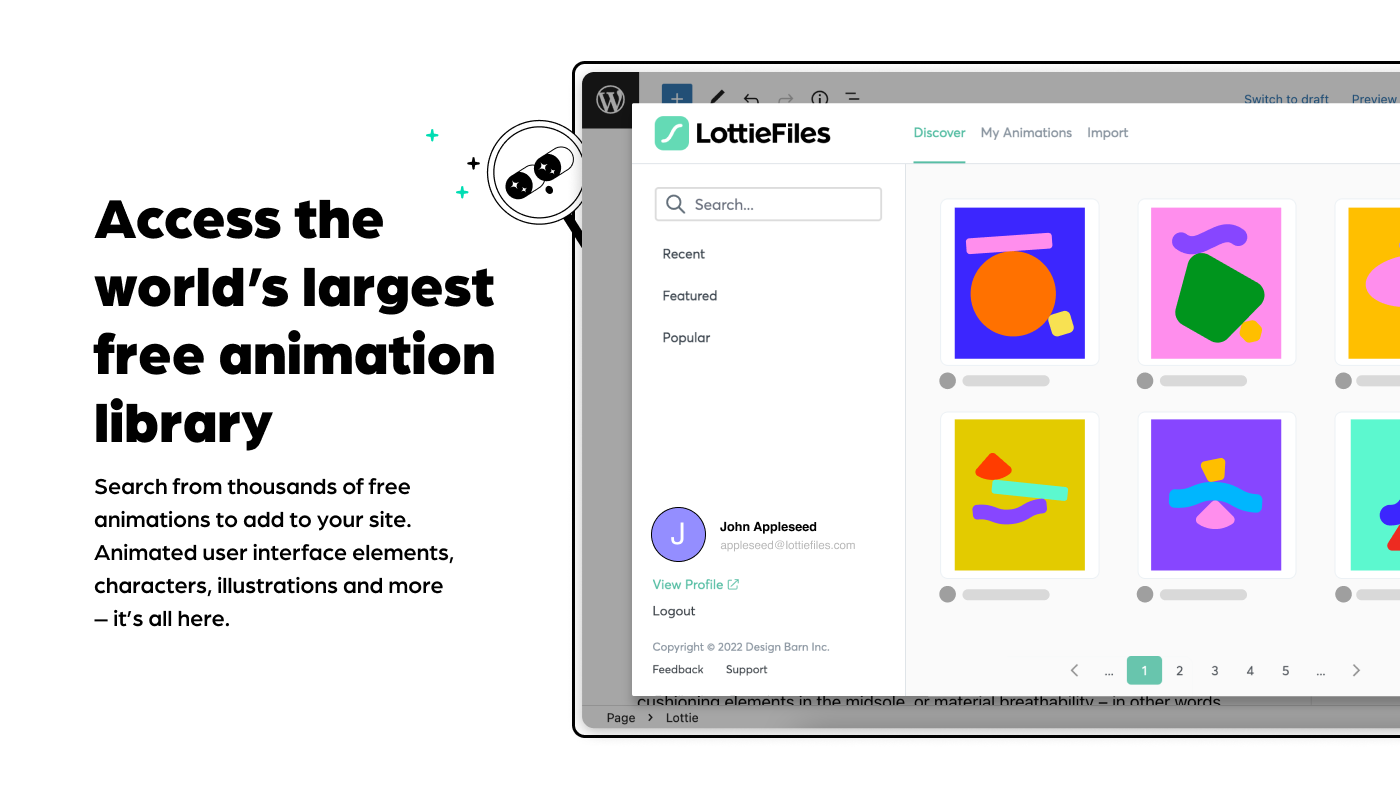
A WordPress site can use Lottie by installing the official LottieFiles plugin, which adds a Lottie block to the Gutenberg editor.
The block offers several ways to add an animation: search the LottieFiles library, drag and drop a file, paste a link or pick a file already in the Media Library. In the block's sidebar, the admin can set speed, how it plays (on load, on click, on scroll or on hover), whether it loops or plays once, reverse playback, size per screen and background colour.
When not to use Lottie
If the motion is very long, or its content can't be drawn as vector shapes (textures or 3D, for example), a Lottie file is no longer light and video is the better choice.
If the animation is the main visual, appears first on the page or takes a lot of space, a still image is better for loading speed. Even if a Lottie file is lighter than some images, it always waits for JS to load before it can render. The Perxel homepage has a Lottie on the first screen too, but only as a decorative detail beside the headline.
If the effect is simple, like a button changing colour, fading or sliding in, CSS can do it and no Lottie file is needed.
If your project needs animation so the page isn't too static and feels more lively, see Perxel's Web animation service.
Footnotes
Want a quote?
Get in touch with Perxel today.