





Meet NectarBlocks
Perxel has used NectarBlocks across several real WordPress custom theme projects. This is a plain review of how it is actually used when building, not a feature tour.
September 12, 2026
In web development, the choice of page builder directly affects performance and the long-term editing experience. For a long time, classic page builders like WPBakery and Elementor were the common choice. They work as a separate system laid over WordPress's core structure, which adds code weight and slows real loading speed.
Gutenberg, WordPress's default editor, changed that. To improve the editing experience for clients, Perxel moved to NectarBlocks on custom theme projects. This article is Perxel's review after using it, not a feature list copied from the developer's homepage.
An added layer, not a separate system
NectarBlocks isn't a standalone page builder that changes the nature of the system. It works as an extra layer that extends Gutenberg core directly. That is a real technical assurance: site owners keep using the default Gutenberg blocks alongside it, with much less risk of being locked into an unfamiliar page builder or breaking when WordPress updates.
The editing experience in practice
The core idea of NectarBlocks is to build layouts and control display properties right inside the WordPress admin. Instead of staying at simple content blocks, it reaches into CSS properties in the editor: rows, columns, responsive settings per device, hover effects and animation.
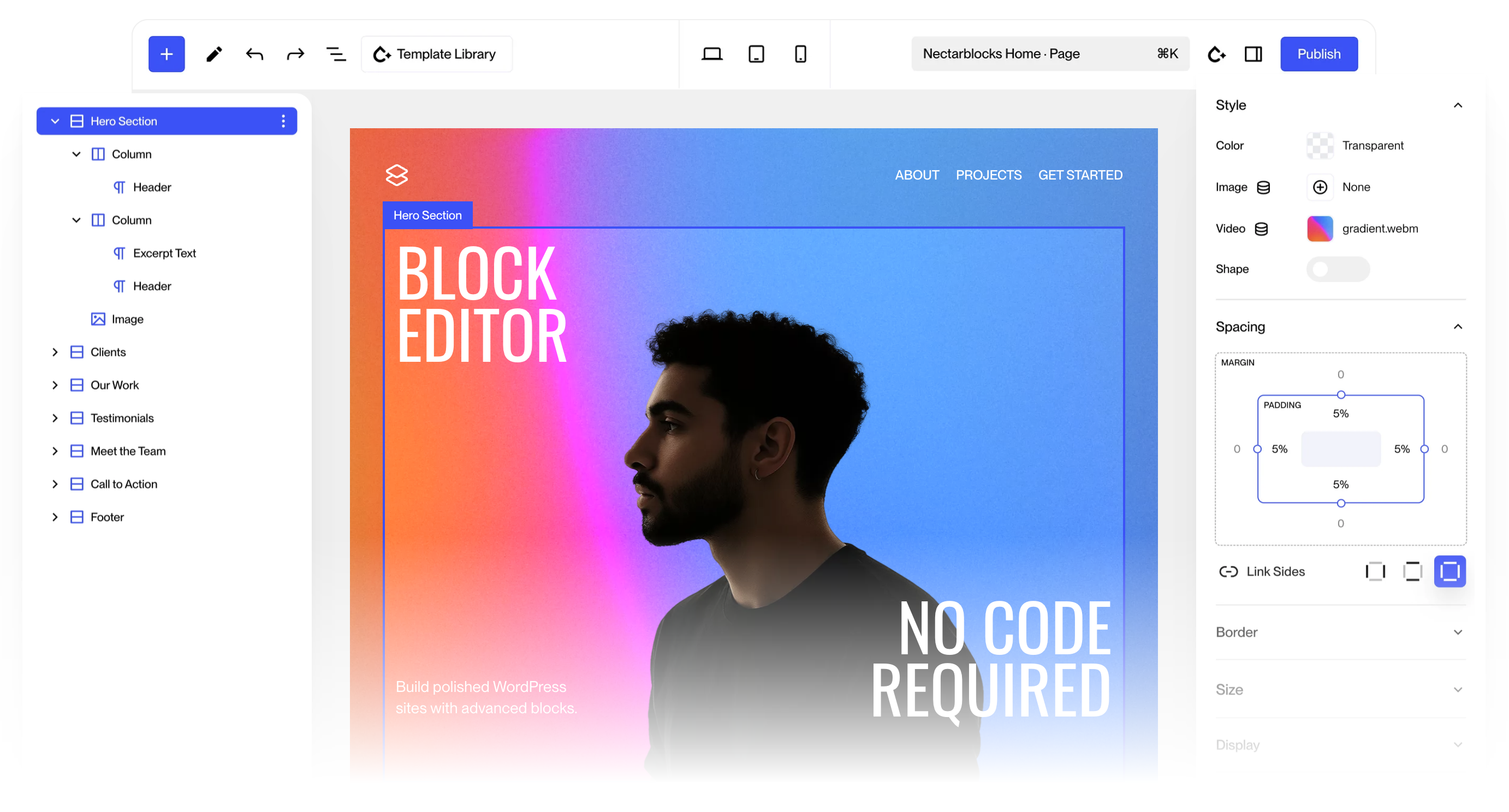
The NectarBlocks editor inside WordPress admin: layer tree on the left, live canvas in the middle, style and spacing panel on the right.
You can think of it as something like Webflow on WordPress. Site owners control spacing (margin, padding), alignment (flexbox, grid) and effects right in the editor, and the code stays lean.
From ready-made blocks to project-specific code
Beyond rows, columns, text and images, NectarBlocks ships a fairly full set of blocks: Post Grid for lists of posts, Carousel and Marquee for horizontal content, Accordion, Testimonial, Icon, Video Lightbox and a separate set for WooCommerce. It also supports scroll animation, global styles for colours and fonts across the site, and dynamic data through Advanced Custom Fields (ACF).
On Perxel's custom theme projects, most of these blocks aren't used directly. A real custom theme means writing bespoke code from the Figma design so the brand's look is its own, so Perxel doesn't use NectarBlocks' prebuilt designs.
Perxel uses only the basic layout blocks (rows, columns, text, images) to shape the page skeleton in the admin. Everything specific to the design, such as animation, testimonials or product layouts, is written by hand so it matches the original drawing, instead of using a page builder's ready-made version.
SEO controls in the image block
One small but useful detail of NectarBlocks is the image block. Alt text, image ratio and link attributes (rel, open in a new tab) all sit in the block's settings panel, instead of a separate settings screen or a field that is easy to miss.
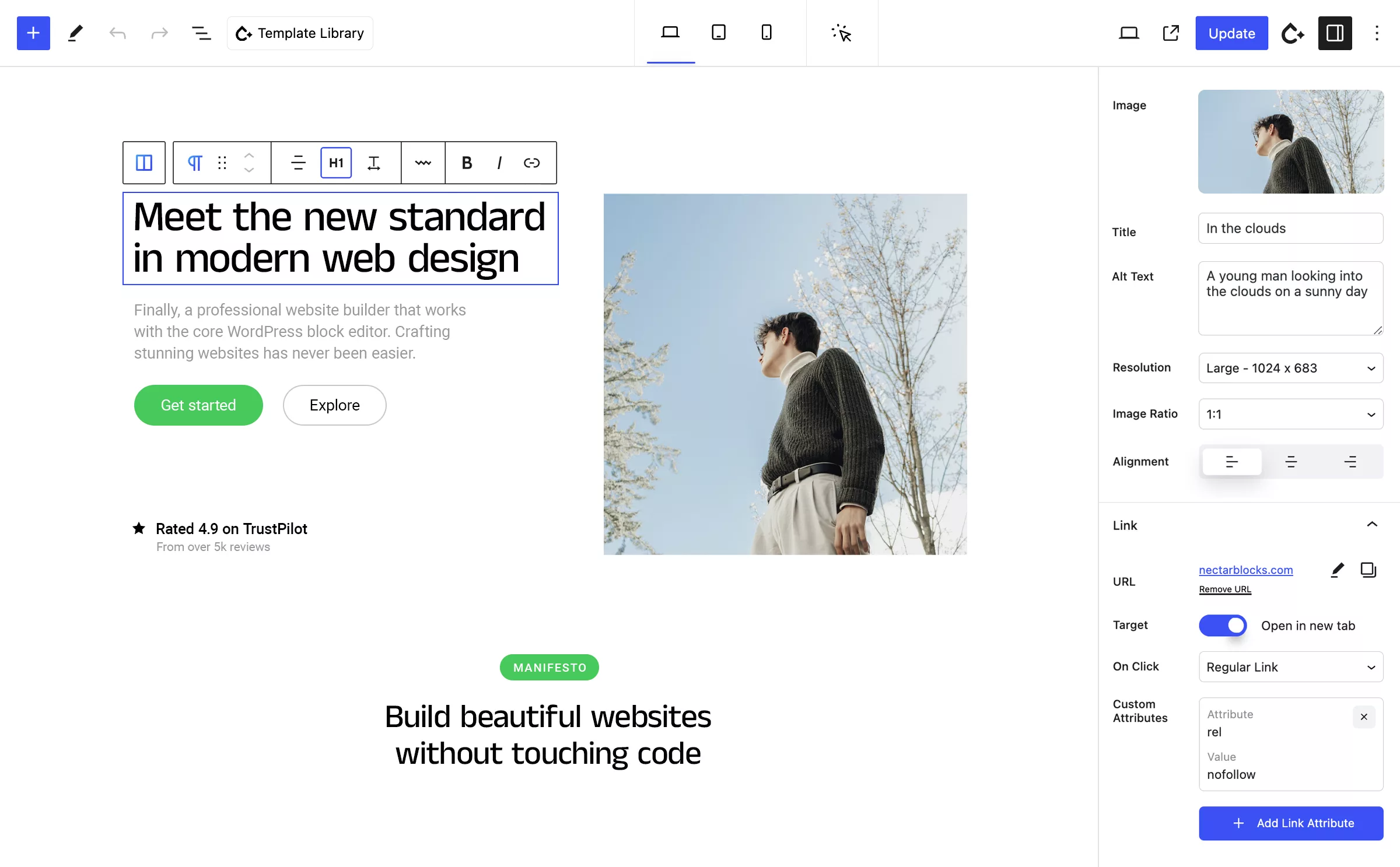
The image block panel: Alt Text, Resolution, Image Ratio and link attributes are all in the editing area.
Alt text is one of the most basic SEO items and the one editors most often skip when they publish posts themselves. Putting the field next to the image, rather than hiding it in a separate tab, makes it more likely that editors fill it in.
Real-world performance
Because NectarBlocks is an added layer on Gutenberg core, not a system of its own, the code it generates is fairly lean. The PageSpeed Insights screenshot below was taken on nectarblocks.com itself, not on a site Perxel delivered, but it shows the technology underneath doesn't bring a significant performance cost.
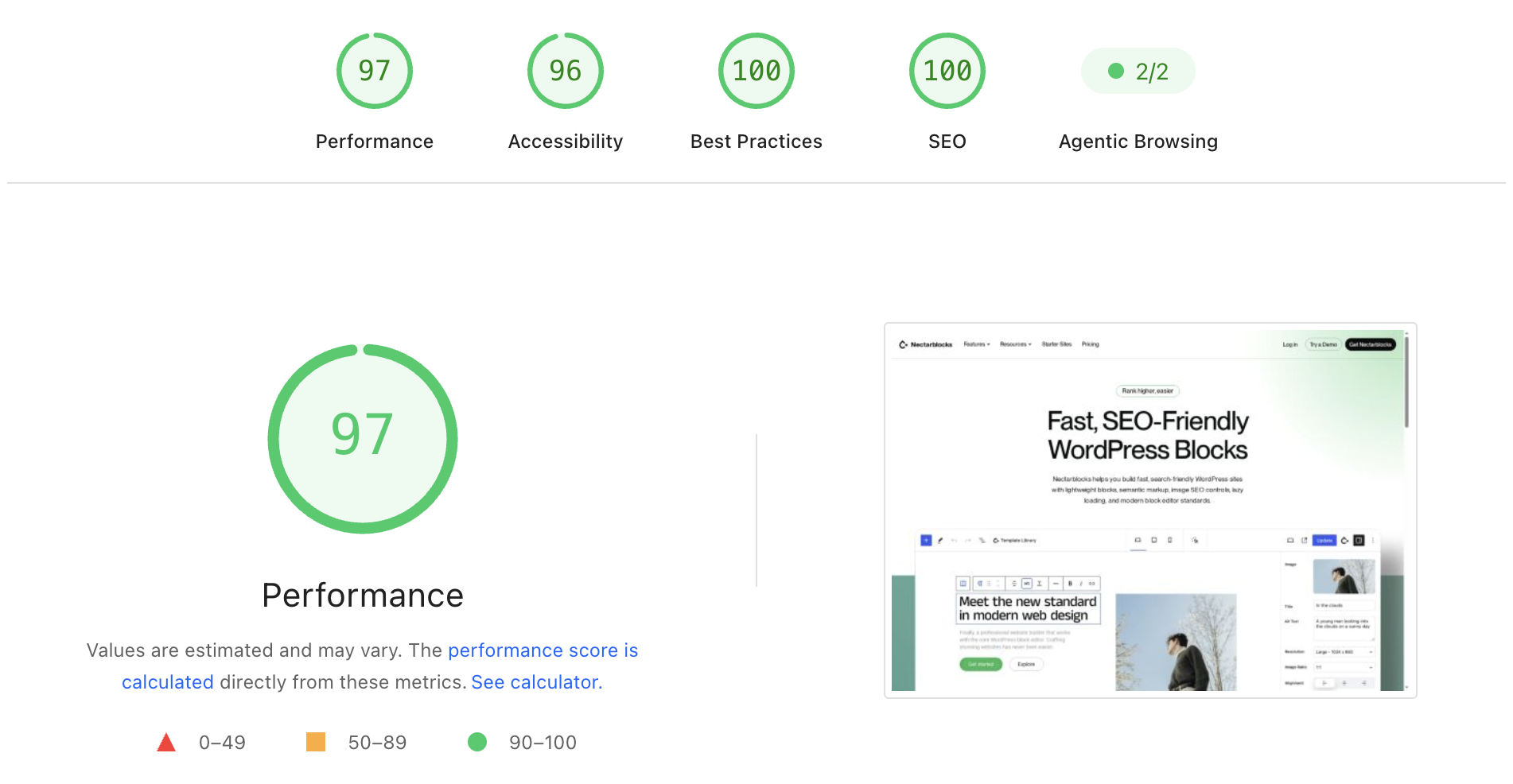
PageSpeed Insights measured on the nectarblocks.com homepage.
The PageSpeed score on any real project also depends on the content, images and hosting plan the client uses after handover. So this is an illustration of the underlying technology, not a score for every website Perxel delivers.
Licence model and continuity
NectarBlocks is a paid page builder, sold as an annual or lifetime licence, not free like core Gutenberg. On Perxel projects the licence cost is part of the initial development cost, so clients don't pay for or renew it themselves.
The licence also keeps things running over the long term:
- Design features keep working. Even after a licence expires, site owners can still edit text and images, change layouts or add pages using the existing blocks, without limits.
- What an expired licence limits. The system stops receiving the latest automatic updates and can't reach the developer's cloud template library.
For sites delivered by Perxel, this barely affects day-to-day running, because the whole interface is written as custom code from the Figma design and doesn't depend on the sample template library.
The editing experience for site owners
- Visual input. Site owners can easily change text, update images or add content in a visual editor without knowing code.
- The layout stays intact. The display logic and the specific design style are written by Perxel in the theme's own code, so everyday content updates don't accidentally break the overall layout.
In short
NectarBlocks is an effective way to extend default Gutenberg without giving up the lightness and loading performance of WordPress core. For Perxel, most of its value is in the basic layout frame and the editing experience for clients, while every real design detail is still written by a developer to stay close to the original Figma idea.
Footnotes
Want a quote?
Get in touch with Perxel today.