



The SEO score in PageSpeed
The SEO score in PageSpeed Insights checks ten basic technical issues. Five sites Perxel built all score 100, yet one of them still had a canonical bug the score never caught. What the score measures, what it misses, and how to keep it after handover.
Phúc Bùi · October 13, 2026
A PageSpeed Insights report has three scores next to Performance: Accessibility, Best Practices and SEO. The SEO score gets little attention because most sites already score fairly high, but it is the one score Perxel commits to hitting 100 at handover. This article covers what the score checks, what we measured on five sites we built, what the score can't see, and how to keep it at 100 as new content goes in.
What the SEO score checks
The SEO score comes from Lighthouse, which runs these checks:
- The page can be indexed. No
noindextag and norobots.txtrule blocks it. This check carries the most weight: if a page is blocked, nothing else matters. - The page has a title and a description. The
<title>tag and the meta description are what Google usually shows in search results. - The page returns a successful HTTP status. A 404 or 500 page is not indexed.
- Links have descriptive text and are crawlable. The link text says what the target page is (not "read more"), and the link is an
<a>tag with a realhref, not a button that runs JavaScript. robots.txtis valid. No malformed lines that Google could misread.- Images have alt text. A short description of each image, so Google and screen readers know what it shows.
hreflangand canonical tags are valid. On a multilingual site, each version points to the others correctly, and every page declares one official URL.
Unlike Performance, none of this depends on the test machine or the network. A site that gets these right scores the same on every run, which is why it is a number we can commit to.
Results on five sites we built
On 13 October 2026 we measured the homepages of five sites, two on WordPress and three on Next.js, with PageSpeed Insights on mobile and with Lighthouse 12 on both mobile and desktop. All five scored 100 for SEO.
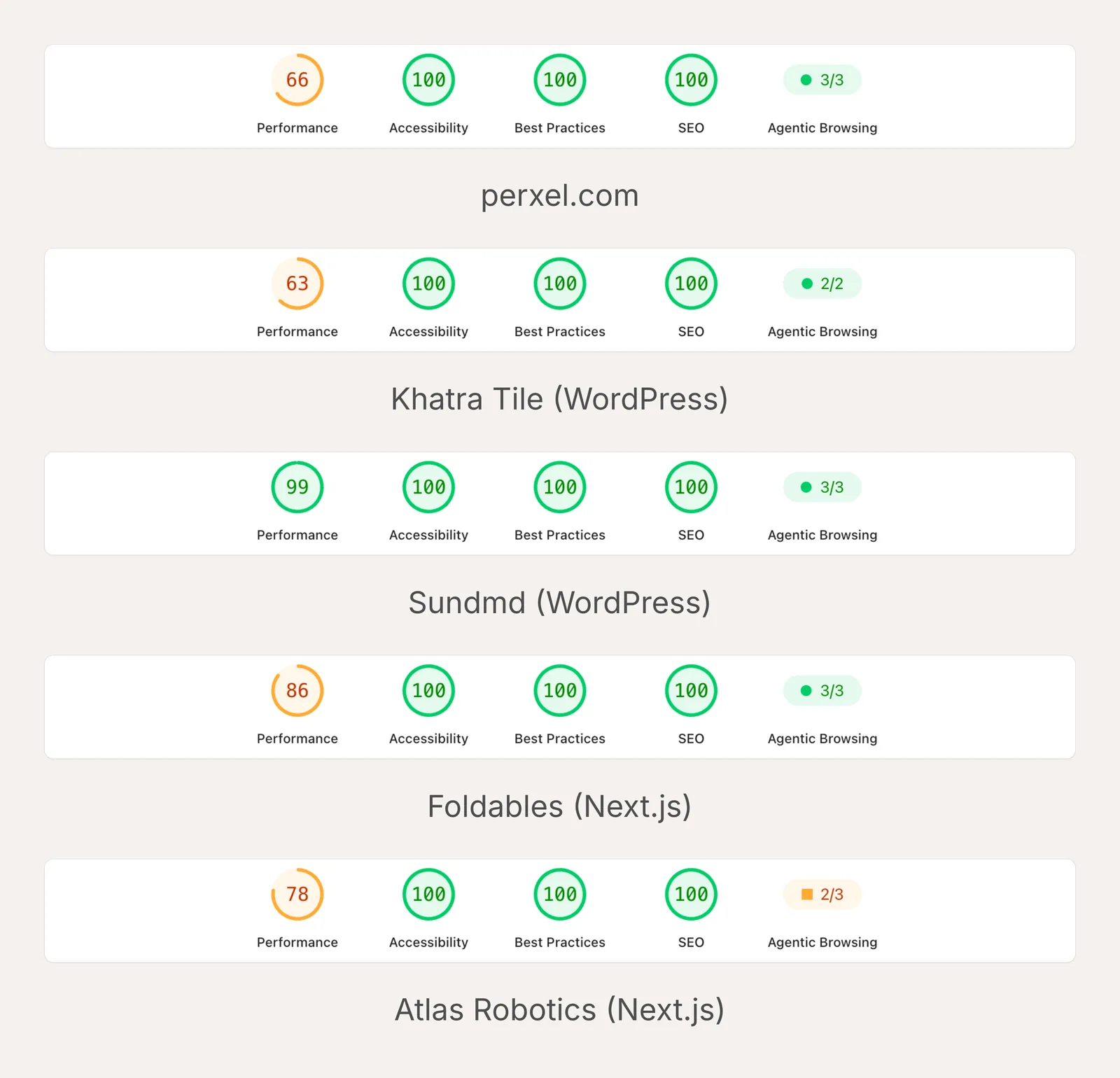
PageSpeed Insights on mobile, measured 13 October 2026. The Performance score moves from run to run; the SEO score doesn't.
- The Perxel website (Next.js). Metadata, sitemap and structured data are written in code, with
hreflangtags for the Vietnamese and English versions. - Khatra Tile (WordPress). A site more than 10 years old, using Rank Math for metadata, the sitemap and business details.
- Sundmd (WordPress). A new build on NectarBlocks, using Yoast SEO for metadata, breadcrumbs and the sitemap.
- Foldables and Atlas Robotics (Next.js). Two marketing site starters on Prismic and TinaCMS, with SEO handled in code like the Perxel site.
The two WordPress sites score 100 because the SEO plugin is configured properly and the theme doesn't undo what the plugin declares. The three Next.js sites score 100 because every tag is generated from the same data as the page content, so no page gets left out.
What a 100 SEO score doesn't catch
While checking these five sites, we found a bug on Atlas Robotics that Lighthouse missed: every canonical URL and every URL in the sitemap had a double slash, like atlas-robotics.perxel.com//about, and the sitemap also listed the 404 page. The cause was a trailing / in the environment variable holding the site address. Lighthouse only checks that a canonical is valid, and a URL with a double slash is still valid syntax, so the score stayed at 100. We fixed it in code by stripping the extra / before building the paths.
Beyond bugs like that, the score leaves out three things that matter:
- Structured data isn't scored. Lighthouse lists it but only as a manual check. To know whether your JSON-LD is right, use Google's Rich Results Test.
- Lighthouse tests one page at a time. A homepage at 100 says nothing about product pages or posts. We check every page type before handover, since each one uses its own template.
- Site structure and keywords are out of scope. The score doesn't know which pages a site has, which search terms each one targets or how they link to each other. That is what tells Google what the site is about, and it is usually what clients ask about most when they rebuild a site.
Keeping 100 after handover
Two of the checks depend on whoever edits the content, not on the code: image alt text and link text. One new post with an undescribed image, or one "read more" button, is enough to drop the score.
- Make alt text a required field in the CMS. On Next.js sites with TinaCMS or Prismic, we declare the image description as required in the content model. On WordPress, the theme reads alt text from the media library, and we show the content team how to fill it in on upload.
- Write link text for the page it leads to. Instead of "read more", name the page or the article.
- Re-test after any big change. When you add a new page type or change the theme, run PageSpeed on that page before it goes live.
FAQ
Does a 100 SEO score get a site to the top of Google?
It doesn't guarantee it. The score only says the site avoids basic technical mistakes. Rankings also depend on whether the content answers what people search for, whether other sites mention it, and how strong the competition is.
Does the SEO score affect whether ChatGPT or Gemini cite a site?
Indirectly. AI tools also need to read a page before they can cite it, so anything that stops Google indexing a page stops them too. The work specific to AI tools is in our article on GEO.
Is a low SEO score on a WordPress site hard to fix?
Usually not. The common issues are missing meta descriptions, images without alt text and icon-only links with no text. Reconfiguring the SEO plugin and fixing a few spots in the theme is often enough to reach 100.
Footnotes
Want a quote?
Get in touch with Perxel today.